self-hosted · local-first · MCP

Evals for AI systems, as an MCP.

A local-first LLM-eval server for Claude or your CI pipeline. Try a real eval below, no signup.

Score RAG by stage. Tell a retrieval miss from a generation miss, so you fix the right half.

Metrics in plain language. Describe what good looks like and retriEVAL writes the rubric.

Every run tracked. History, charts and a dashboard link for each eval you run.

Try it live

Run a real eval right here, no signup. Pick a sample (or paste your own input, context, and output), choose a free judge model, and watch retriEVAL score it. Nothing is saved.

1Choose a sample
2Metric

Jev checks every claim in parallel and shows its probability for each one.

3Judge

Runs on a free model · nothing is saved · limited per day

Sending to the judge model…
new judge · Jev by TypeSafe AI

Same verdict, in a fraction of the time.

Jev doesn't explain or reason. It answers one question per claim, is this supported, yes or no, and how sure, and it answers fast. retriEVAL splits the answer into sentences, Jev checks every one in parallel, and the highlight shows exactly which claims are wrong.

Use Jev fora quick pass or fail on every claim: CI gates, regression runs, long answers, lots of cases.
Use the LLM judge fora written explanation of why a claim is wrong, when a reviewer needs the reasoning.
< 1 s vs 8–12 s
Jev (fast mode) against gpt-oss-120b on the same answers in the sandbox, typically more than 10× faster. Both judges reached the same pass or fail.
15 / 15
Planted errors caught in a 51-claim API answer, including all five changed numbers. No false alarms. A strong LLM judge also caught 15 of 15.
$0.002
To check all 51 claims. Output tokens are free; you pay for input only.

Measured in retriEVAL's sandbox and MCP server, September 2026. Jev gives a probability per claim, never a reason: the report shows which sentences fail and by how much, and the answer itself, highlighted, shows where. In Claude, pass judge="jev" to run_eval.

The loop: score your AI's outputs, track them, improve
01 · Collect
Outputs
from your app or RAG
→
02 · Score
By stage
retriever vs generator
→
03 · Track
Charts + history
on your dashboard
→
04 · Improve
Iterate
gate quality over time

What makes it different

The metrics aren't new; DeepEval and Ragas cover those. The shape is: a standalone, local-first MCP an agent can call mid-workflow, with RAG scored by stage.

stage-separated

Retriever vs generator

contextual_recall flags retrieval misses; faithfulness flags hallucinations. Know which half to fix, not just "the answer is bad."

in your chat

Runs inside Claude

Connect it like any other tool and score outputs, author metrics, and pull up charts by asking. retriEVAL is the scoring engine your workflow reaches for.

bring your own model

Your model, your key

Run free on a local Ollama model, or plug in your own Claude, OpenAI, or any OpenAI-compatible LLM key. No platform account, no data leaving your box.

history

Charts + run history

Every run is saved (file or Supabase). Trend by model, compare runs, drill into the case that regressed, on a dashboard you own.

Or just run evals by chatting

No pipeline required. Connect retriEVAL in Claude or another chat UI, toggle it on, and a manual tester can score outputs and author metrics in plain language. Every result links straight to the run in the dashboard.

Toggle it on, like any connector
Connectors
Web search
retriEVAL
Google Drive

Illustration. Uses the hosted server, since chat UIs connect to remote MCPs.

Evals appear right in the chat
Chat
Score this answer against the refund policy: faithfulness and answer relevancy.
Ran 3 metrics on 12 cases  1 FAILING
faithfulness.92PASS
answer_relevancy.88PASS
contextual_recall.58FAIL

Quickstart

Self-hosted. Clone it, point it at a judge, run it. Your data never leaves your machine.

Install & run
git clone https://github.com/hcarrillo001/retrieval-mcp
cd retrieval-mcp
pip install -r requirements.txt

# pick a judge, or use a local one below
export ANTHROPIC_API_KEY=sk-ant-...
python server.py
Then just ask
# in the chat: paste your cases inline
"Score these cases with faithfulness:
 [{"input": "...",
   "actual_output": "...",
   "retrieval_context": ["..."]}]"

# nothing is stored, no setup step

Pick your judge: free local Ollama (RETRIEVAL_JUDGE_BACKEND=ollama) to keep everything on your machine, or your Anthropic key, your OpenAI key, or any OpenAI-compatible endpoint via OPENAI_BASE_URL. Full setup, including your own always-on instance with a dashboard, is in the repo README.

See it in action

A full walkthrough, plus the three steps to run it yourself in Cursor.

Connect retriEVAL and run an eval
Add the connector, load a golden set, score it, and open the run in the dashboard.

Cursor setup

Run retriEVAL locally as an MCP server in Cursor.
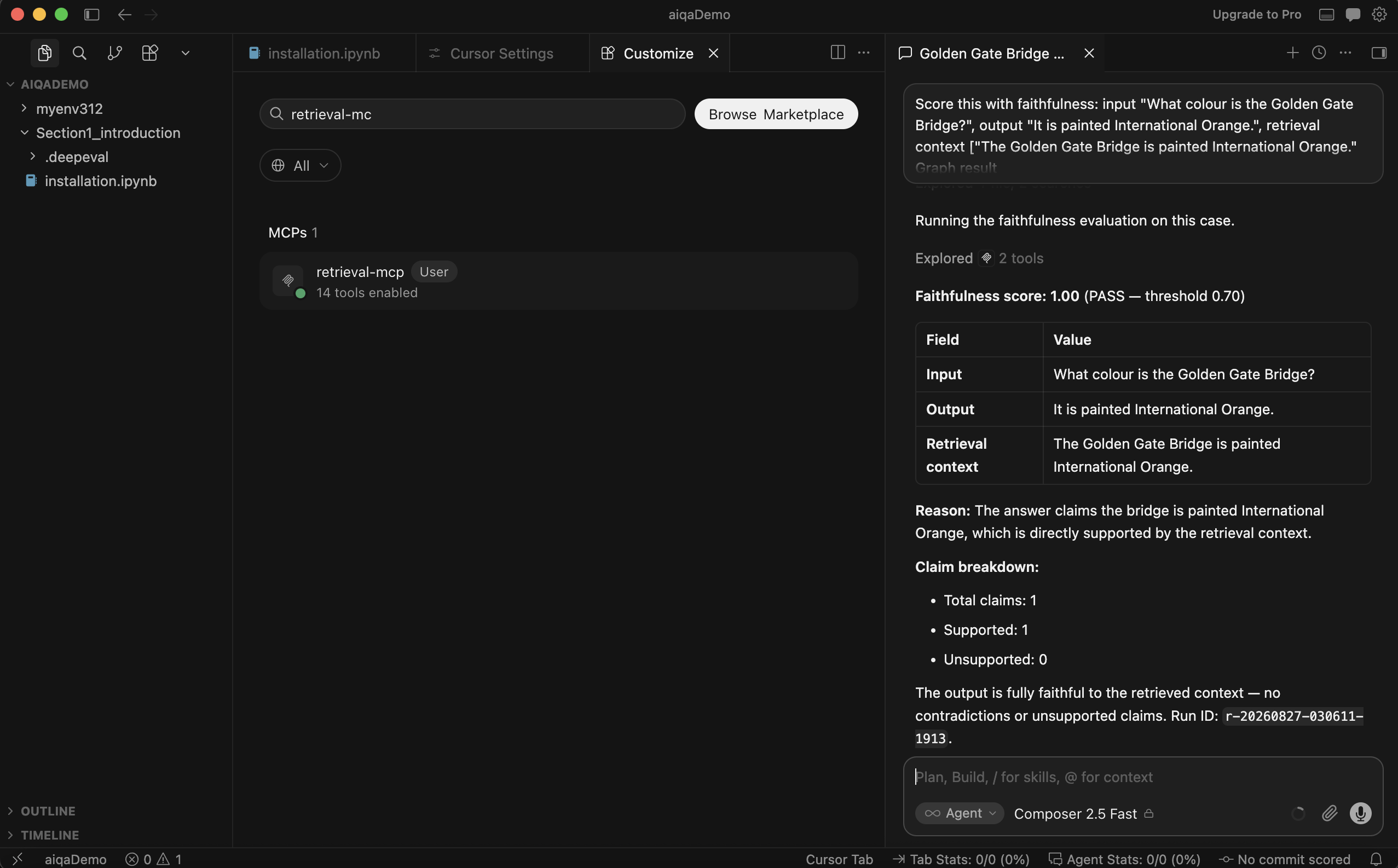
Cursor Customize panel showing retrieval-mcp connected with 14 tools enabled

What you're aiming for: connected in Cursor, green dot, 14 tools enabled.

Copy, paste, run. About two minutes, and you need Docker Desktop plus a judge key (an Anthropic key here, or skip it and run a local model, see below).

1
Start Docker Desktop and wait for the whale icon to stop animating. Nothing to download: the first run pulls the image for you. Docker has to be running before Cursor starts, or the server won't launch and Cursor won't tell you why.
2
Run this in your terminal. It creates the config Cursor reads:
mkdir -p ~/.cursor && cat > ~/.cursor/mcp.json <<'EOF'
{
  "mcpServers": {
    "retrieval-mcp": {
      "command": "docker",
      "args": ["run", "-i", "--rm", "-e", "ANTHROPIC_API_KEY",
               "ghcr.io/hcarrillo001/retrieval-mcp:1.0.0"],
      "env": { "ANTHROPIC_API_KEY": "sk-ant-PUT-YOUR-KEY-HERE" }
    }
  }
}
EOF
Already have a ~/.cursor/mcp.json? This overwrites it, so paste the retrieval-mcp block into your existing file instead.
3
Put your key in and check it parsed:
open -a Cursor ~/.cursor/mcp.json

# replace sk-ant-PUT-YOUR-KEY-HERE, save, then:
python3 -c "import json;json.load(open('$HOME/.cursor/mcp.json'));print('valid json')"
4
Restart Cursor, open Settings → Customize, and look for retrieval-mcp with a green dot and 14 tools enabled. Then paste this into the chat:
# in the Cursor chat: expect 1.00, all claims supported
Score this with faithfulness:
 input "What colour is the Golden Gate Bridge?",
 output "It is painted International Orange.",
 retrieval context ["The Golden Gate Bridge is
  painted International Orange."]

No green dot? Docker wasn't running when Cursor started. Start it and restart Cursor. Want to keep everything local? Add "RETRIEVAL_JUDGE_BACKEND": "ollama" to the env block, drop the API key, and no data leaves your machine. Runs are written inside the container, never to a hosted database.

Prefer to try it yourself? Run a live eval in the sandbox. No signup.

How it compares

Honest positioning: not "better metrics," but a different shape: standalone, local, and usable as a tool inside an agent.

 retriEVALHosted eval platformsEval libraries
Works as an MCP tool inside an agentyesplatform-gatedno
Runs local, no accountyesnoyes
Bring your own model / key (Ollama, Claude, OpenAI, …)yeslimitedyes
RAG scored by stage, built inyesvariesmanual
Own dashboard + historyyesyesno